DateRangePicker
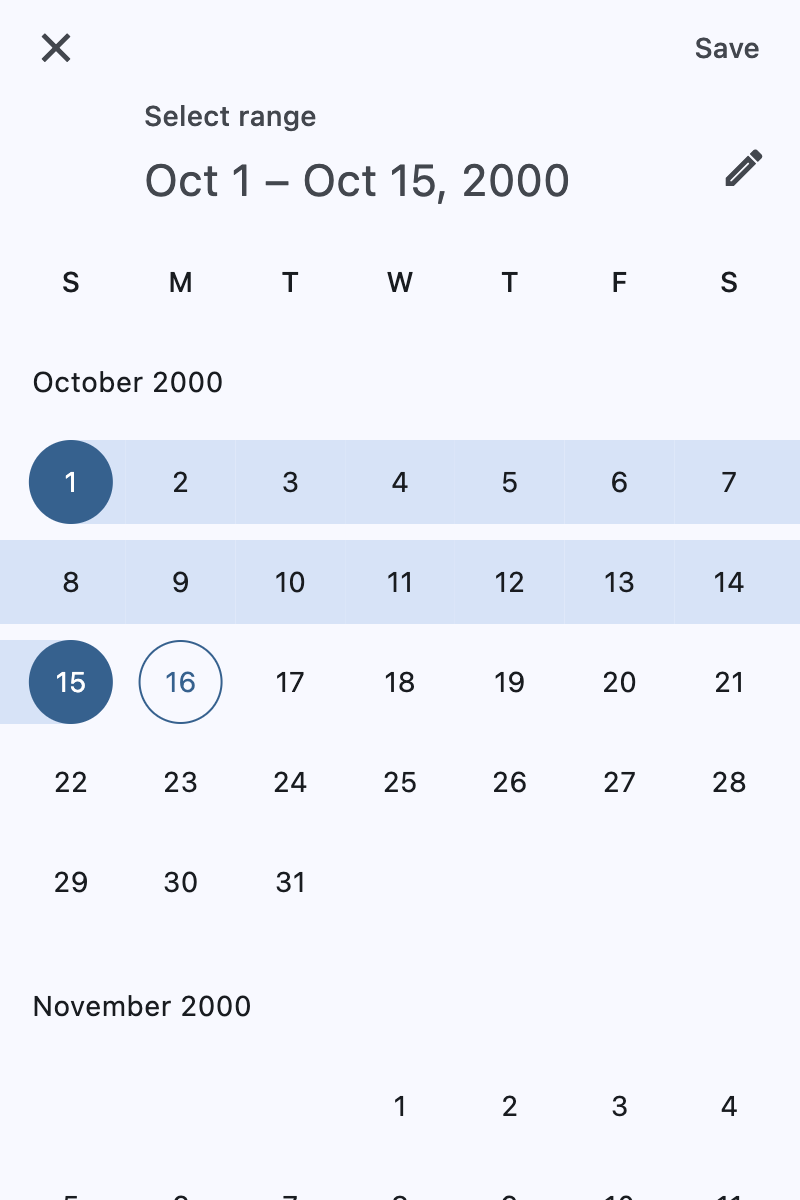
A Material-style date range picker dialog.
It can be opened by calling Page.show_dialog() method.
Depending on the entry_mode, it will show either a Calendar
or an Input (TextField) for picking a date range.
Inherits: DialogControl
Properties
-
barrier_color(ColorValue | None) –The color of the modal barrier that
-
cancel_text(str | None) –The text that is displayed on the cancel button.
-
confirm_text(str | None) –The text that is displayed on the confirm button.
-
current_date(DateTimeValue) –The date representing today. It will be highlighted in the day grid.
-
end_value(DateTimeValue | None) –The selected end date that the picker should display.
-
entry_mode(DatePickerEntryMode) –The initial mode of date entry method for the date picker dialog.
-
error_format_text(str | None) –The error message displayed below the TextField if the entered date is not in the
-
error_invalid_range_text(str | None) –The message used when the date range is invalid (e.g. start date is after end date).
-
error_invalid_text(str | None) –The error message displayed below the TextField if the date is earlier than
-
field_end_hint_text(str | None) –The text used to prompt the user when no text has been entered in the end field.
-
field_end_label_text(str | None) –The label for the end date text input field.
-
field_start_hint_text(str | None) –The text used to prompt the user when no text has been entered in the start field.
-
field_start_label_text(str | None) –The label for the start date text input field.
-
first_date(DateTimeValue) –The earliest allowable date on the date range.
-
help_text(str | None) –The text that is displayed at the top of the header.
-
keyboard_type(KeyboardType) –The type of keyboard to use for editing the text.
-
last_date(DateTimeValue) –The latest allowable date on the date range.
-
locale(Locale | None) –The locale for this date picker dialog. It is intended for (rare) cases where this
-
modal(bool) –Whether this date picker cannot be dismissed by clicking the area outside of it.
-
save_text(str | None) –The label on the save button for the fullscreen calendar mode.
-
start_value(DateTimeValue | None) –The selected start date that the picker should display.
-
switch_to_calendar_icon(IconData | None) –The name of the icon displayed in the corner of the dialog when
-
switch_to_input_icon(IconData | None) –The name of the icon displayed in the corner of the dialog when
Events
-
on_change(ControlEventHandler[DateRangePicker] | None) –Called when user clicks confirm button.
Examples#
Basic Example#
import datetime

import flet as ft


def main(page: ft.Page):
    page.horizontal_alignment = ft.CrossAxisAlignment.CENTER

    def handle_change(e: ft.Event[ft.DateRangePicker]):
        page.add(
            ft.Text(
                f"Start Date changed: {e.control.start_value.strftime('%m/%d/%Y')}"
            ),
            ft.Text(f"End Date changed: {e.control.end_value.strftime('%m/%d/%Y')}"),
        )

    def handle_dismissal(e: ft.Event[ft.DialogControl]):
        page.add(ft.Text("DatePicker dismissed"))

    today = datetime.datetime.now()

    drp = ft.DateRangePicker(
        start_value=datetime.datetime(year=today.year, month=today.month, day=1),
        end_value=datetime.datetime(year=today.year, month=today.month, day=15),
        on_change=handle_change,
        on_dismiss=handle_dismissal,
    )

    page.add(
        ft.Button(
            content=ft.Text("Pick date"),
            icon=ft.Icons.PHONE,
            on_click=lambda e: page.show_dialog(drp),
        )
    )


ft.run(main)
Properties#
class-attribute
instance-attribute
#
barrier_color: ColorValue | None = None
The color of the modal barrier that darkens everything below the date picker.
If None, the DialogTheme.barrier_color
is used.
If it is also None, then Colors.BLACK_54 is used.
class-attribute
instance-attribute
#
cancel_text: str | None = None
The text that is displayed on the cancel button.
class-attribute
instance-attribute
#
confirm_text: str | None = None
The text that is displayed on the confirm button.
class-attribute
instance-attribute
#
current_date: DateTimeValue = field(
    default_factory=lambda: now()
)
The date representing today. It will be highlighted in the day grid.
class-attribute
instance-attribute
#
end_value: DateTimeValue | None = None
The selected end date that the picker should display.
Defaults to current_date.
class-attribute
instance-attribute
#
entry_mode: DatePickerEntryMode = CALENDAR
The initial mode of date entry method for the date picker dialog.
class-attribute
instance-attribute
#
error_format_text: str | None = None
The error message displayed below the TextField if the entered date is not in the correct format.
class-attribute
instance-attribute
#
error_invalid_range_text: str | None = None
The message used when the date range is invalid (e.g. start date is after end date).
class-attribute
instance-attribute
#
error_invalid_text: str | None = None
The error message displayed below the TextField if the date is earlier than
first_date or
later than last_date.
class-attribute
instance-attribute
#
field_end_hint_text: str | None = None
The text used to prompt the user when no text has been entered in the end field.
class-attribute
instance-attribute
#
field_end_label_text: str | None = None
The label for the end date text input field.
class-attribute
instance-attribute
#
field_start_hint_text: str | None = None
The text used to prompt the user when no text has been entered in the start field.
class-attribute
instance-attribute
#
field_start_label_text: str | None = None
The label for the start date text input field.
class-attribute
instance-attribute
#
first_date: DateTimeValue = field(
    default_factory=lambda: datetime(
        year=1900, month=1, day=1
    )
)
The earliest allowable date on the date range.
class-attribute
instance-attribute
#
help_text: str | None = None
The text that is displayed at the top of the header.
This is used to indicate to the user what they are selecting a date for.
class-attribute
instance-attribute
#
keyboard_type: KeyboardType = DATETIME
The type of keyboard to use for editing the text.
class-attribute
instance-attribute
#
last_date: DateTimeValue = field(
    default_factory=lambda: datetime(
        year=2050, month=1, day=1
    )
)
The latest allowable date on the date range.
class-attribute
instance-attribute
#
locale: Locale | None = None
The locale for this date picker dialog. It is intended for (rare) cases where this dialog should be localized differently from the rest of the page.
It overrides the locale used by the page (see Page.locale_configuration),
but does not participate in page-level locale resolution.
If set to None (the default) or an inexistent/unsupported locale,
the current_locale of the
Page.locale_configuration is used as fallback.
class-attribute
instance-attribute
#
modal: bool = False
Whether this date picker cannot be dismissed by clicking the area outside of it.
class-attribute
instance-attribute
#
save_text: str | None = None
The label on the save button for the fullscreen calendar mode.
class-attribute
instance-attribute
#
start_value: DateTimeValue | None = None
The selected start date that the picker should display.
Defaults to current_date.
class-attribute
instance-attribute
#
switch_to_calendar_icon: IconData | None = None
The name of the icon displayed in the corner of the dialog when
entry_mode
is DatePickerEntryMode.INPUT.
Clicking on this icon changes the entry_mode to
DatePickerEntryMode.CALENDAR.
If None, Icons.CALENDAR_TODAY is used.
class-attribute
instance-attribute
#
switch_to_input_icon: IconData | None = None
The name of the icon displayed in the corner of the dialog when
entry_mode
is DatePickerEntryMode.CALENDAR.
Clicking on this icon changes the entry_mode to
DatePickerEntryMode.INPUT.
If None, Icons.EDIT_OUTLINED is used.
Events#
class-attribute
instance-attribute
#
on_change: ControlEventHandler[DateRangePicker] | None = (
    None
)
Called when user clicks confirm button.
start_value and
end_value are updated with selected dates.
The data property of the event handler argument contains the selected dates.